


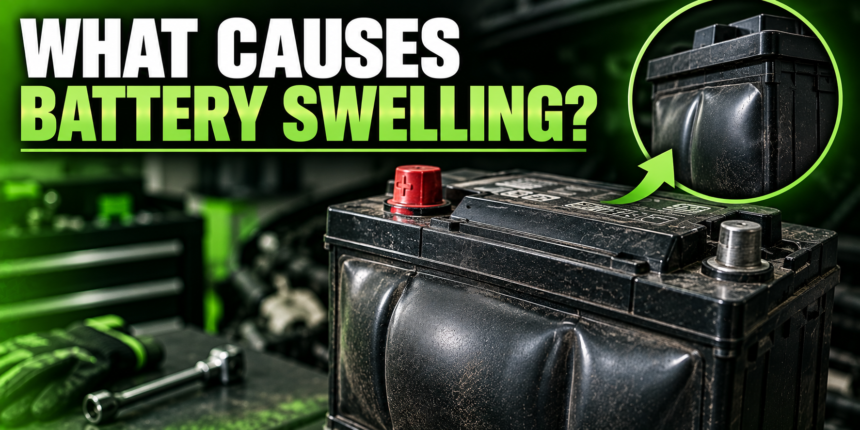
Battery swelling is caused by gas building up inside the sealed battery casing, and that gas is usually the result of overcharging, excessive heat, deep discharge, old age, physical damage, or a manufacturing defect. It happens in both the lithium-ion batteries in phones and laptops and the lead-acid batteries in cars. Whatever the trigger, a swollen battery is a warning sign that something has gone wrong inside, and it needs to be dealt with, not ignored. Here is what causes it and what to do.
- The one thing behind every swollen battery: trapped gas
- Overcharging and a bad charging system
- Heat
- Deep discharge
- Age and wear
- Physical damage and manufacturing defects
- How to spot a swollen battery
- What to do with a swollen battery
- How to prevent battery swelling
- Conclusion
- Frequently asked questions
- Is a swollen battery dangerous?
- Can a swollen battery be fixed?
- Why did my phone battery swell on its own?
- Can a car battery swell from overcharging?
- Is it safe to use a device with a swollen battery?
- Related Articles
The one thing behind every swollen battery: trapped gas
Before the individual causes, it helps to understand the single mechanism they all share. A battery makes power through chemical reactions inside a sealed housing. When those reactions go wrong, or run too hard, they produce gas.
Normally a battery either avoids making excess gas or vents it safely. But when gas is produced faster than it can escape, it collects inside the casing. As more builds up, the internal pressure rises and the housing has nowhere to expand but outward, so it puffs, bloats, or bulges. That is swelling. Every cause below is really just a different way of making the battery generate gas it cannot get rid of.
The core idea: Swelling is trapped gas under pressure. The various causes, heat, overcharging, age, and the rest, are just different reasons the battery starts producing that gas.
Overcharging and a bad charging system
Overcharging is one of the most common causes. Pushing more voltage into a battery than it is designed to take forces the chemical reactions to run too fast, which generates heat and releases gases that have nowhere to go.
In a car, this often traces to the charging system pushing too much voltage: a malfunctioning alternator, a faulty voltage regulator, the wrong charger, or, in vehicles with a battery management system (BMS), a new battery that was never registered so the system keeps overcharging it. In phones and laptops, cheap chargers and low-quality aftermarket batteries that lack proper safety features raise the same risk. A healthy BMS is supposed to prevent this, so a swollen device battery can also mean that protection has failed.
Heat
Batteries and high temperatures do not mix. Heat speeds up the chemical breakdown inside a battery and accelerates the reactions that produce gas, so a hot battery swells faster.

For a car battery, that heat can come from the engine, a scorching summer, or both, which is why deformed batteries show up more in hot climates. For a phone, leaving it in a hot car or on a sunny dashboard does the same thing. Heat and overcharging often work together, since overcharging creates heat and heat worsens the reactions, forming a loop that ages the battery quickly and pushes it toward swelling.
Charging while the device is already hot is a common everyday version of this. Gaming or streaming for hours while plugged in, or charging a phone under a pillow where the heat cannot escape, keeps the cell warm exactly when it is under the most stress. Small habits like taking a case off during a long charge, or not charging in direct sun, quietly reduce how much heat the battery has to absorb.
Deep discharge
Draining a battery too far, and doing it repeatedly, is another trigger. Running a battery all the way down to empty stresses its internal chemistry and can damage the internal structure.
That damage makes the battery more likely to produce and trap gas over time. For lithium-ion devices, habitually letting the battery hit zero before recharging shortens its life and raises the odds of swelling. The internal structure that safely handles charging and discharging simply degrades faster when it is pushed to the extremes at either end. This is also why a device left dead in a drawer for months can come back swollen: sitting at zero charge for a long stretch lets the cell slip below a safe voltage, and the chemistry that follows can generate the gas that puffs it up.
Age and wear
Sometimes swelling is just a battery reaching the end of its life. Every battery degrades a little with each charge and discharge cycle, and the internal materials slowly break down.
As a battery ages, those degrading components generate gas, and a worn-out cell loses the ability to vent or manage that gas cleanly, so it starts to puff instead. This is why an old phone or laptop battery can swell even if you always treated it well. It is not necessarily something you did wrong; it can simply be the cell wearing out. The same is true of an aging car battery whose internal components have deteriorated.
Physical damage and manufacturing defects
Two less common but real causes round out the list. Physical damage, from drops, crushing, or a hard impact, can dent a battery or damage its internal protective layers, which can trigger the internal short circuits and gas production that lead to swelling.
Manufacturing defects are rarer still. Flaws introduced during production, like separators that are too thin or tiny bits of debris inside the cell, can cause internal short circuits that generate heat and gas. When a nearly new battery swells for no obvious reason, a defect is often the explanation. A good technical overview of these mechanisms is available from Acroname’s guide to battery swelling.
How to spot a swollen battery
Catching swelling early keeps it from becoming a safety problem. The signs differ a little between a device battery and a car battery, but the theme is the same: the battery is changing shape or behaving oddly.
| Sign | Phone / laptop battery | Car battery |
| Shape | Back cover or screen bulging | Casing puffy on top or sides |
| Fit | Device won’t sit flat; gaps appear | Battery tight in its tray |
| Smell | Sometimes a chemical odor | Strong sulfur / rotten-egg smell |
| Behavior | Fast draining, overheating | Hard starting, especially when cold |
If you see any of these, treat the battery as failing. A device that no longer sits flat, a back cover lifting away, or a car battery visibly bulging at the seams all mean the same thing: pressure has built up inside and the battery needs to go.
What to do with a swollen battery
A swollen battery is a genuine safety hazard. The trapped gas makes the cell unstable, and in the worst case it can leak, rupture, or catch fire. Handle it carefully.
- Stop using it and stop charging it. Continuing to use or charge a swollen battery, or leaving it plugged in, is dangerous. Power the device down.
- Never puncture or press on it. Do not try to flatten, pierce, or squeeze the bulge. Puncturing a swollen lithium-ion battery can cause fire or an explosion.
- Keep it away from heat and sparks. Move it away from flames, heat sources, and anything flammable while you deal with it.
- Replace it, do not repair it. A swollen battery is done. It must be replaced, and for devices that often means professional service to remove it safely.
- Dispose of it properly. Take it to a battery recycling or hazardous-waste drop-off, not the regular trash. A lithium fire-containment bag is a safe way to hold it in the meantime.
How to prevent battery swelling
You cannot stop a battery from aging, but you can avoid the habits that cause premature swelling. A few simple practices make a real difference:
- Avoid heat. Keep devices and vehicles out of extreme heat where you can. Do not leave a phone in a hot car or on a sunny sill.
- Use the right charger. Stick to the manufacturer’s charger or a quality equivalent, and avoid cheap chargers and no-name replacement batteries.
- Don’t run it to empty. Recharge devices before they hit zero rather than routinely draining them flat.
- Keep the car’s charging system healthy. Have the alternator and voltage regulator checked if you suspect overcharging, and register a new car battery with the BMS if your vehicle needs it.
- Replace aging batteries. Swap out an old, weak battery before it fails, rather than pushing it until it swells.
Conclusion
Battery swelling comes down to gas building up inside a sealed cell, driven by overcharging, heat, deep discharge, age, physical damage, or a defect. It shows up as a bulging casing, a device that no longer sits flat, or a car battery puffed at the seams.
Whatever the cause, a swollen battery is unsafe: stop using it, never puncture it, and replace and recycle it. Avoid heat, use good chargers, and don’t run batteries flat, and you will keep swelling rare.
Frequently asked questions
Is a swollen battery dangerous?
Yes. The trapped gas makes the cell unstable, and it can leak, rupture, or catch fire, especially if punctured or overheated. Stop using it and replace it right away.
Can a swollen battery be fixed?
No. Swelling is permanent internal damage. The only safe response is to replace the battery and recycle the old one. Never try to flatten or drain it back to normal.
Why did my phone battery swell on its own?
Usually age, heat, overcharging, or repeated deep discharge, and sometimes a defect. A worn cell produces gas it can no longer vent, so it puffs up even without obvious misuse.
Can a car battery swell from overcharging?
Yes. A faulty alternator or voltage regulator pushing too much voltage overheats the battery and releases gas, swelling the casing. A sulfur smell often comes with it.
Is it safe to use a device with a swollen battery?
No. Even if it still works, using or charging a device with a swollen battery is dangerous. Power it down, keep it cool, and have the battery replaced safely.
Related Articles
How Long Do Trolling Motor Batteries Last?
Which Battery Has the Most Voltage?