


If you’ve just unboxed a new Xbox or picked up a spare controller, one of the first questions that pops into your head is probably this: what batteries do Xbox controllers use? It’s a fair question, because unlike some gaming consoles that ship with built-in rechargeable batteries, Xbox controllers give you a bit more freedom — and a bit more to think about.
- Types of Xbox Controllers & Their Battery Systems
- Default Battery Type: AA Batteries
- How Many AA Batteries Are Needed?
- Alkaline vs. Lithium AA Batteries
- Average Battery Life
- Pros and Cons of Using AA Batteries
- Rechargeable Battery Options
- Xbox Play and Charge Kit
- How It Works and Installation?
- Battery Life and Charging Time
- Third-Party Rechargeable Battery Packs
- Rechargeable NiMH AA Batteries as an Alternative
- How to Check Battery Level?
- How to Replace or Insert Batteries?
- Comparing Battery Options: Which Is Best?
- Cost Comparison
- Environmental Impact
- Convenience and Long-Term Value
- Recommendations Based on Usage Type
- Tips to Extend Battery Life
- Turn Off the Controller When Not in Use
- Adjust Vibration Settings
- Reduce Bluetooth/Wireless Interference
- Keep Firmware Updated
- Troubleshooting Common Battery Issues
- Controller Not Turning On Despite Battery Installation
- Rechargeable Battery Not Charging
- Batteries Draining Too Fast
- Compatibility Issues with Third-Party Batteries
- Frequently Asked Questions (FAQ)
- Conclusion
- Related Articles
Choosing the right battery setup isn’t just a small detail. It affects how much you spend over time, how convenient your gaming sessions are, and even how your controller performs during long play sessions. A controller that dies mid-match because of a cheap battery can be more than a little frustrating.
In this guide, we’ll walk through everything you need to know about Xbox controller batteries — from the standard AA setup to rechargeable alternatives, how to check your battery level, replacement steps, and tips to make your batteries last longer. By the end, you’ll know exactly which option fits your gaming habits best.
Types of Xbox Controllers & Their Battery Systems
Before diving into battery types, it helps to understand which controllers we’re talking about, since Microsoft has released a few different generations over the years.
Xbox One Controller
The Xbox One controller, released back in 2013, was designed to run on two AA batteries right out of the box. This design choice made it easy for players to swap batteries on the fly without needing to hunt for a charging cable.
Xbox Series X|S Controller
When Microsoft launched the Xbox Series X and Series S in 2020, the controller design was refreshed with a new share button and improved grip, but the power setup stayed largely the same — it still relies on two AA batteries as the default option.
Differences Between Generations
While the controllers look slightly different and have some updated features like better D-pads and textured grips, the battery compartment and power requirements haven’t changed much between generations. This means older rechargeable kits and AA battery holders are often still compatible with newer controllers, which is good news if you’ve been collecting accessories over the years.
More EV News
Default Battery Type: AA Batteries
So, what batteries do Xbox controllers use by default? The straightforward answer is AA batteries — and this has been the standard since the very first Xbox controllers.
How Many AA Batteries Are Needed?
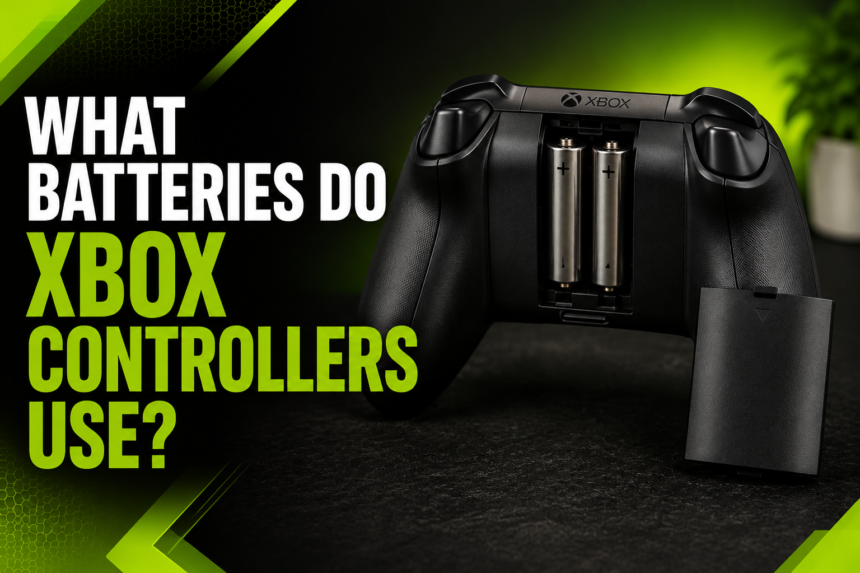
Every Xbox controller, whether it’s from the Xbox One or Xbox Series X|S lineup, requires exactly two AA batteries to function. These sit in a compartment on the back of the controller, held in place by a battery cover.
Alkaline vs. Lithium AA Batteries
Not all AA batteries perform the same way, and the type you choose can make a noticeable difference:
| Battery Type | Average Lifespan | Cost | Best For |
|---|---|---|---|
| Alkaline (standard) | 20–30 hours | Low | Casual, occasional gamers |
| Lithium (e.g., Energizer Ultimate) | 30–40+ hours | Medium-High | Frequent, long gaming sessions |
| Rechargeable NiMH | 10–20 hours per charge | Medium (one-time) | Eco-conscious, regular gamers |
Lithium batteries tend to outlast alkaline ones and perform more consistently as they drain, while alkaline batteries are cheaper upfront but need replacing more often.
Average Battery Life
On average, a fresh set of alkaline AA batteries will keep your Xbox controller running for around 20 to 30 hours, depending on usage. Turning on features like vibration or using a headset plugged into the controller can shorten this lifespan somewhat.
Pros and Cons of Using AA Batteries
There’s a lot to like about the simplicity of AA batteries, but they come with trade-offs too.
- Pros: Easy to find anywhere, quick to swap during gameplay, no need to stop and charge
- Cons: Ongoing cost if using disposables, environmental waste, occasional inconsistency in battery quality
Rechargeable Battery Options
If constantly buying AA batteries doesn’t appeal to you, Xbox offers rechargeable alternatives that can save money and reduce waste over time.
Xbox Play and Charge Kit
Microsoft’s official solution is the Xbox Play and Charge Kit, a rechargeable battery pack designed specifically to replace the standard AA batteries. It comes with a USB-C cable that lets you charge the controller directly, even while playing.
How It Works and Installation?
Installing the Play and Charge Kit is simple. You remove the battery cover, take out any AA batteries if they’re inserted, and slot in the rechargeable battery pack in their place. Once it’s in, you connect the USB-C cable from the controller to your console or another power source to begin charging.
Battery Life and Charging Time
The Play and Charge Kit typically offers around 30 hours of battery life on a full charge, and it usually takes a few hours to charge completely from empty. Many players simply plug in their controller overnight to have it ready for the next day.
Third-Party Rechargeable Battery Packs
Beyond Microsoft’s official kit, there are several third-party rechargeable battery packs available from brands that specialize in gaming accessories. These often come at a lower price point, though quality and battery life can vary, so it’s worth checking reviews before purchasing.
Rechargeable NiMH AA Batteries as an Alternative
Another popular option is using rechargeable NiMH AA batteries, which look and function just like regular AA batteries but can be recharged hundreds of times using a separate charger. This gives you the flexibility of the AA format combined with the cost savings of rechargeable technology.
How to Check Battery Level?
Keeping an eye on your battery level helps you avoid unexpected shutdowns during gameplay.
Checking via the Xbox Console
On your Xbox console, you can check your controller’s battery percentage by opening the guide menu (press the Xbox button) and navigating to the profile or settings section, where connected devices display their current charge level.
Checking via the Xbox Accessories App
For more detailed information, the Xbox Accessories app — available on both Xbox consoles and Windows PCs — shows a clear battery percentage and lets you customize other controller settings at the same time.
Low Battery Indicators
When your controller’s battery is running low, you’ll typically notice the Xbox button light flashing or the console displaying an on-screen notification. This is your cue to swap batteries or plug in for a charge.
How to Replace or Insert Batteries?
Replacing batteries in an Xbox controller is a quick process that takes less than a minute once you know the steps.
Step-by-Step Battery Replacement Guide
- Turn off the controller by holding the Xbox button until the lights turn off.
- Locate the battery compartment cover on the back of the controller.
- Press the small latch or slide the cover to remove it.
- Take out the old batteries and insert new ones, following the polarity markings inside the compartment.
- Replace the cover until it clicks securely into place.
- Turn the controller back on and reconnect it if necessary.
Battery Compartment Location
The battery compartment is located at the top back of the controller, above the grips, and is designed to be easily accessible without any tools.
Safety Tips
Always make sure the positive and negative ends of the batteries match the markings inside the compartment. Mixing battery brands or combining old and new batteries can lead to inconsistent performance, so it’s best to replace both batteries at the same time.
Comparing Battery Options: Which Is Best?
With multiple options available, it helps to compare them side by side before deciding what works best for your situation.
Cost Comparison
Disposable alkaline batteries seem cheaper initially, but the cost adds up over months of regular use. Rechargeable options like the Play and Charge Kit or NiMH batteries require a bit more upfront investment but pay off over time since they can be reused hundreds of times.
Environmental Impact
Rechargeable batteries are the clear winner when it comes to reducing environmental waste. Disposable batteries contribute to landfill waste and require ongoing manufacturing resources, while rechargeables cut down on this significantly.
Convenience and Long-Term Value
Rechargeable kits eliminate the need to keep spare batteries on hand, though they do require occasional downtime to charge. AA batteries, on the other hand, let you swap instantly without waiting.
Recommendations Based on Usage Type
- Casual gamers who play occasionally may find standard alkaline AA batteries perfectly sufficient.
- Regular gamers who play daily will likely benefit more from a rechargeable pack or NiMH batteries.
- Competitive or long-session gamers might prefer keeping a spare set of lithium AA batteries on hand for quick swaps during marathon sessions.
Tips to Extend Battery Life
Regardless of which battery type you use, a few simple habits can help your controller’s power last longer.
Turn Off the Controller When Not in Use
Leaving your controller on standby drains the battery even when you’re not actively playing, so make it a habit to power it off when you’re done.
Adjust Vibration Settings
Vibration feedback is a fun feature, but it does consume extra power. Lowering or disabling vibration intensity in your Xbox settings can help extend battery life during long sessions.
Reduce Bluetooth/Wireless Interference
Keeping your controller closer to the console and minimizing interference from other wireless devices can help it maintain a stronger, more efficient connection, which in turn conserves battery.
Keep Firmware Updated
Microsoft occasionally releases firmware updates for Xbox controllers that can include power efficiency improvements, so keeping your controller’s firmware current is a small but worthwhile step.
Troubleshooting Common Battery Issues
Even with the right batteries, occasional issues can pop up. Here’s how to handle the most common ones.
Controller Not Turning On Despite Battery Installation
If your controller won’t power on, double-check that the batteries are inserted correctly and try a different set, since even new batteries can occasionally be faulty.
Rechargeable Battery Not Charging
If your Play and Charge Kit isn’t charging, inspect the USB-C cable for damage and try a different port or cable to rule out a connection issue.
Batteries Draining Too Fast
Fast battery drain is often linked to high vibration settings, extended wireless range, or connected accessories like headsets. Adjusting these factors can noticeably improve battery longevity.
Compatibility Issues with Third-Party Batteries
Occasionally, off-brand batteries or battery packs may not fit as snugly or perform as reliably as official ones, so sticking with reputable brands can help avoid these headaches.
Frequently Asked Questions (FAQ)
Can I use any AA batteries? Yes, any standard AA batteries — alkaline, lithium, or rechargeable NiMH — will work in an Xbox controller.
Does the Xbox Series X|S controller use different batteries than the Xbox One? No, both controller generations use the same two AA battery setup, so accessories are largely interchangeable.
How long does the Play and Charge Kit last? On a full charge, it generally provides around 30 hours of gameplay before needing to be recharged again.
Can I play while charging? Yes, Xbox controllers can be used while connected via USB-C cable, allowing you to keep playing even as the battery charges.
Conclusion
So, what batteries do Xbox controllers use? At their core, all Xbox controllers — from the original Xbox One model to the latest Xbox Series X|S version — rely on two AA batteries as the standard power source. That said, players have plenty of flexibility, whether they prefer the simplicity of swapping in fresh alkaline or lithium batteries, or the long-term convenience and eco-friendliness of a rechargeable option like the Xbox Play and Charge Kit or reusable NiMH batteries.
Ultimately, the best choice comes down to your personal gaming habits. Casual players might not mind the occasional battery swap, while daily gamers will likely appreciate the savings and convenience that rechargeable options provide. Whichever route you choose, keeping a spare set of batteries or a charged backup pack nearby ensures your gaming sessions never get cut short.
Related Articles
Battery Acid Explained: What It Is, How It Works, and Safety Tips
How Long Does a Honda Hybrid Battery Last? A Complete Guide for Owners
How Long Does a DeWalt Battery Last? Lifespan, Runtime & Care Guide