


A garage door remote that suddenly stops working is one of the most common household frustrations, and in most cases, the real culprit is a weak or dead battery rather than a broken device.
- Signs Your Remote Battery Needs Replacing
- Tools and Materials Needed
- Common Garage Door Remote Battery Types
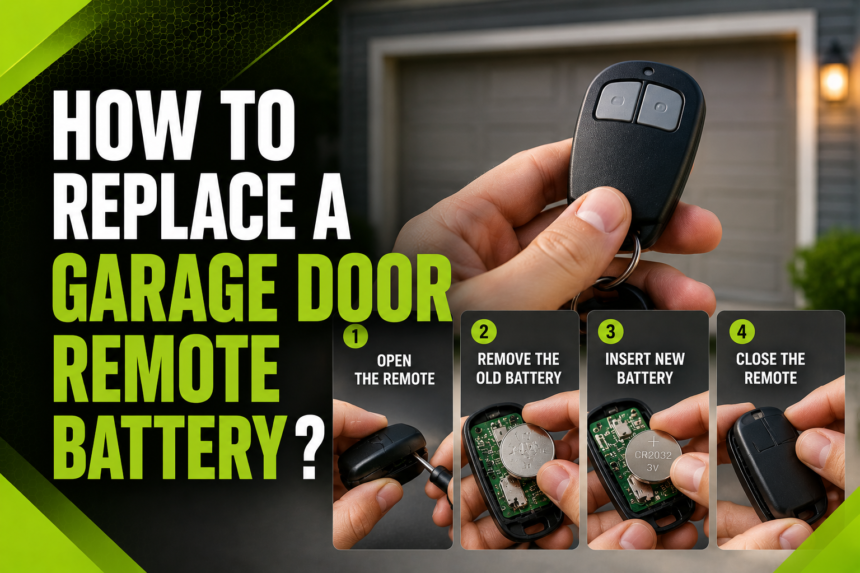
- Step-by-Step Guide on How to Replace a Garage Door Remote Battery
- Locating and Opening the Battery Compartment
- Removing the Old Battery Safely
- Inserting the New Battery Correctly
- Closing the Compartment and Testing
- What to Do If the Remote Still Doesn’t Work
- Tips for Extending Remote Battery Life
- Brand-Specific Notes
- How This Guide Compares to Other Online Resources
- Frequently Asked Questions
- How long do garage door remote batteries typically last?
- Can I use a rechargeable battery instead?
- What if the remote still doesn’t open the door after a new battery?
- Where can I buy replacement batteries?
- Conclusion
- Related Articles
Learning how to replace a garage door remote battery is a simple task that almost anyone can do at home without calling a technician or spending extra money. The process usually takes less than five minutes once you know which battery your remote uses and how to open its compartment.
This guide walks you through every step in plain, easy language, along with helpful tips, a battery comparison table, and answers to common questions so you never get stuck with a remote that refuses to open your garage door again.
Signs Your Remote Battery Needs Replacing
Before jumping into the replacement process, it helps to recognize the early warning signs of a dying battery. These signals usually appear gradually rather than all at once, giving you time to prepare a replacement.
Delayed or Weak Response
When the battery starts losing power, you may notice a short delay between pressing the button and the garage door actually responding. This lag happens because the remote is struggling to send a strong enough signal to the receiver unit.
Reduced Signal Range
A healthy remote usually works from a good distance, even from inside a moving car. As the battery weakens, you may find yourself needing to get closer and closer to the garage door before it responds, which is a clear indicator that a replacement is due soon.
Dim or No Indicator Light
Most remotes have a small LED light that blinks when a button is pressed. If this light appears dim, flickers, or does not turn on at all, it strongly suggests the internal battery no longer has enough charge to power the circuit properly.
Tools and Materials Needed
Replacing a garage door remote battery does not require any specialized toolkit, and most households already have everything necessary lying around. Knowing what to gather beforehand makes the process faster and prevents interruptions halfway through.
Basic Items to Prepare
You will typically need a replacement battery that matches your remote model, a small flathead screwdriver or a coin for compartments that twist open, and optionally a soft dry cloth to wipe the battery contacts. Having these items ready before you start avoids unnecessary back-and-forth trips.
Checking the Correct Battery Type in Advance
It is worth checking your remote’s model number or existing battery label before buying a new one, since garage door remotes are not all built the same way. Buying the wrong battery size is one of the most common mistakes people make, so a quick check saves both time and money.
Common Garage Door Remote Battery Types
Different manufacturers use different battery types depending on the remote’s design, size, and age. Knowing which one applies to your device helps you shop correctly the first time.
Coin Cell Batteries
Many modern, slim remotes use small coin-shaped batteries such as CR2032, CR2016, or CR2025. These batteries are compact, long-lasting, and widely available at grocery stores, pharmacies, and hardware shops.
A23 Alkaline Batteries
Some remote brands, especially older or bulkier models, rely on a 12-volt A23 battery instead of a coin cell. This battery type is slightly less common but still easy to find in most electronics or battery specialty stores.
The table below summarizes the most common battery types used in garage door remotes, along with their typical characteristics.
| Battery Type | Voltage | Common Use | Average Lifespan |
| CR2032 | 3V | Slim, modern remotes | 1–2 years |
| CR2016 | 3V | Compact keychain remotes | 1–2 years |
| CR2025 | 3V | Mid-size remotes | 1–2 years |
| A23 | 12V | Older or bulkier remotes | 1–3 years |
Step-by-Step Guide on How to Replace a Garage Door Remote Battery
This is the core part of the process, and once you understand the sequence, you will be able to repeat it confidently in the future without needing to look up instructions again.
Locating and Opening the Battery Compartment
Start by turning the remote over to find the battery compartment, which is usually marked by a small seam, sliding tab, or one or two tiny screws. Depending on the design, you may need to slide the cover, twist it open with a coin, or unscrew it gently with a small screwdriver.
Removing the Old Battery Safely
Once the compartment is open, take a moment to observe how the old battery sits inside, noting which side faces up. Gently lift or slide the old battery out, being careful not to bend any small metal contact clips inside the compartment, since these clips are what keep the connection stable.
Inserting the New Battery Correctly
Place the new battery in the exact same orientation as the one you removed, matching the positive and negative sides carefully. Incorrect polarity is one of the most frequent reasons a “fixed” remote still fails to work afterward, so double-checking this step is important.
Closing the Compartment and Testing
After the new battery is seated properly, close the compartment cover or tighten the screws back in place. Point the remote toward the garage door opener and press the button to confirm that the door responds normally, ideally testing it from both close range and a short distance away.
What to Do If the Remote Still Doesn’t Work
Sometimes a battery replacement alone does not immediately solve the problem, and this section explains what to check next before assuming the remote is broken.
Re-Syncing the Remote to the Opener
If the door does not respond, the remote may need to be re-paired with the main garage door opener unit. Most openers have a small “learn” or “program” button on the motor housing that allows you to re-sync the remote by pressing it briefly and then pressing the remote button as instructed in the opener’s manual.
Checking for Physical Damage
If re-syncing does not help, inspect the remote for cracks, water damage, or corrosion around the battery contacts, since physical damage can prevent the circuit from working even with a fresh battery. In such cases, replacing the entire remote may be more practical than continuing to troubleshoot it.
Tips for Extending Remote Battery Life
A few simple habits can help your garage door remote battery last noticeably longer, reducing how often you need to repeat this process.
Avoid Extreme Temperatures
Leaving a remote inside a hot car during summer or in freezing conditions during winter can degrade battery performance much faster than normal use. Storing it in a stable, moderate environment helps preserve battery life over time.
Keep Contacts Clean and Dry
Dust, moisture, or corrosion on the battery contacts can interfere with the connection even when the battery itself is still good. Wiping the contacts occasionally with a dry cloth keeps the connection strong and consistent.
Brand-Specific Notes
While the overall process of how to replace a garage door remote battery remains largely similar across brands, small design differences do exist between popular manufacturers.
Chamberlain and LiftMaster
These brands typically use a sliding battery cover with a coin cell battery, and the compartment usually opens without needing any tools at all.
Genie and Craftsman
Genie and Craftsman remotes often use small screws to secure the battery cover, which means a small screwdriver is usually necessary rather than optional for these models.
How This Guide Compares to Other Online Resources
Many existing guides online only list bare steps without explaining battery types, warning signs, or troubleshooting steps in detail, which often leaves readers with leftover questions.
This guide aims to fill those gaps by combining the replacement steps with practical context, a battery comparison table, and brand-specific notes so that readers do not need to search multiple sources to get a complete answer.
Frequently Asked Questions
How long do garage door remote batteries typically last?
Most garage door remote batteries last between one and two years under normal daily use, though frequency of use and storage conditions can shorten or extend this timeframe.
Can I use a rechargeable battery instead?
Rechargeable batteries are generally not recommended for garage door remotes because their voltage output is often slightly different from standard batteries, which can cause inconsistent performance.
What if the remote still doesn’t open the door after a new battery?
If the door still does not respond, try re-syncing the remote with the opener’s learn button, and if that fails, the remote itself may need replacement.
Where can I buy replacement batteries?
Coin cell and A23 batteries are widely available at supermarkets, pharmacies, hardware stores, and online retailers, making them easy to find almost anywhere.
Conclusion
Knowing how to replace a garage door remote battery is a small skill that saves time, money, and unnecessary frustration whenever your remote starts acting up. By identifying the warning signs early, using the correct battery type, and following the simple replacement steps outlined above, most people can fix the issue in just a few minutes. Keeping a spare battery at home ensures you are never caught off guard the next time your remote’s signal starts to fade.
Related Articles
Battery Acid Explained: What It Is, How It Works, and Safety Tips
Can a Battery Be Too Dead to Jump? When a Jump Works and When It Won’t