


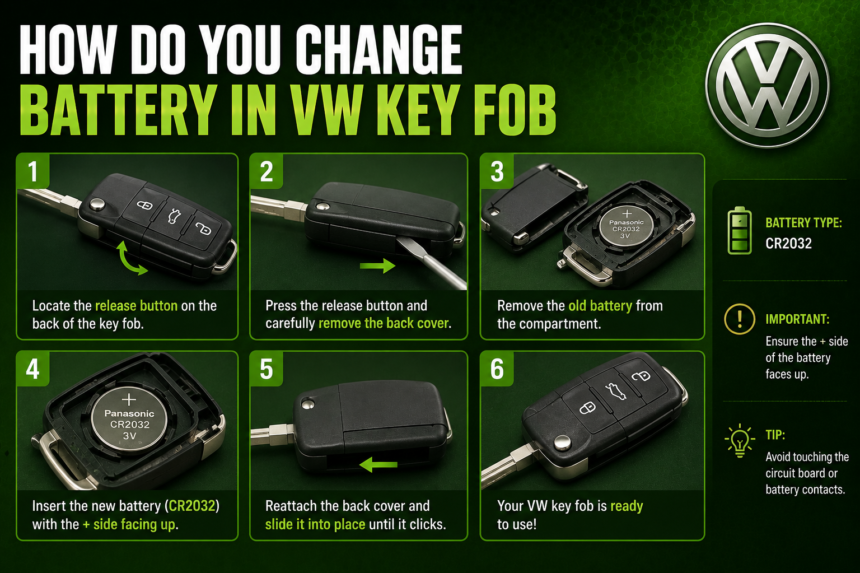
If you’re wondering how do you change battery in VW key fob, the good news is that it’s a five-minute job you can do yourself with just a small screwdriver and a fresh coin-cell battery. You don’t need a locksmith, a dealership appointment, or any special tools. This guide walks you through identifying the right battery, replacing it safely, and troubleshooting any issues afterward — so you can get your remote working again today.
- Signs Your VW Key Fob Battery Is Dying
- Which Battery Does a VW Key Fob Use?
- Tools You’ll Need
- How to Change the Battery in a VW Key Fob: Step-by-Step
- Do You Need to Reprogram the Key Fob After Changing the Battery?
- Troubleshooting: Fob Still Not Working After a Battery Change
- Starting Your VW Without a Working Key Fob
- How Often Do VW Key Fob Batteries Need Replacing?
- Battery Safety and Disposal
- How Much Does It Cost to Replace a VW Key Fob Battery?
- Frequently Asked Questions
- Final Thoughts
- Related Articles
Signs Your VW Key Fob Battery Is Dying
Before you assume you need a replacement key, look for these common warning signs of a low key fob battery:
- The remote’s range has shrunk, and you need to stand right next to the car to lock or unlock it
- You have to press the lock or unlock button multiple times before it responds
- The trunk release or remote start feature (if equipped) stops working, even though the doors still lock manually
- Some newer Volkswagen models will display a “Key Battery Low” or similar warning message on the instrument cluster or infotainment screen
- The fob’s LED indicator (on models that have one) dims or stops lighting up when pressed
If you notice any of these symptoms, a battery swap is almost always the fix — and it’s worth trying before assuming the fob itself is broken.
Which Battery Does a VW Key Fob Use?
Volkswagen has used a few different remote and key fob designs over the years, and each takes a specific battery. Check your fob style against the list below before you buy a replacement:
- Older-style VW keys that fold out like a traditional car key or have a simple button pad usually take a CR1632 battery.
- Standard key fobs made for most Volkswagen models since the early 2000s — the ones shaped like a small plastic pod with buttons on one side and a fold-out emergency blade key — typically use a CR2032 battery. This is the most common type across the current VW lineup, including the Jetta, Tiguan, Atlas, Golf, and Taos.
- Proximity/comfort key fobs, found on higher trims of models like the Atlas, Tiguan, and ID.4, which allow keyless entry and push-button start, most often use a CR2032 as well, though some designs use a CR2450. Because these fobs have thicker housings and more electronics, it’s worth confirming the battery type printed inside the case or in your owner’s manual before buying.
CR2032 and CR1632 batteries are inexpensive (typically $1–$5 for a two-pack) and widely available at pharmacies, hardware stores, big-box retailers, and auto parts stores across the US, so there’s no need to special-order one from the dealership.
Tools You’ll Need
- A small flat-head screwdriver (a coin or plastic pry tool also works and is gentler on the plastic housing)
- The correct replacement battery (CR1632, CR2032, or CR2450, depending on your fob)
- A small piece of tape (optional, to wrap the screwdriver tip and avoid scratches)
- A clean, flat surface to work on so you don’t lose the small internal battery clip or screws
How to Change the Battery in a VW Key Fob: Step-by-Step
Once you’ve confirmed your battery type and gathered your tools, follow these steps:
- Eject the emergency key. Press and hold the small release button on the fob until the metal emergency blade key pops out. Set it aside.
- Find the seam. Look for the thin seam running around the edge of the fob where the top and bottom halves meet. On most VW fobs, this seam is near where the emergency key was stored.
- Pry the case open. Insert the flat-head screwdriver (or a pry tool) gently into the seam and twist slightly to separate the two halves. Work your way around the edge in small increments rather than forcing one spot — this prevents cracking the plastic. If you wrapped the screwdriver tip in tape, you’ll further reduce the risk of scratches.
- Remove the old battery. Once the case is open, you’ll see the battery sitting in a small metal clip or tray. Note which side faces up before removing it — most VW fobs have the positive (+) side facing down toward the circuit board, but always check the markings on the old battery and the outline printed inside the case to be sure.
- Insert the new battery. Place the fresh battery into the clip in the same orientation as the old one. Avoid touching the flat faces of the battery with your bare fingers if possible, since oils from your skin can affect the contact points — handle it by the edges.
- Snap the case shut. Press the two halves of the fob back together firmly along the seam until you hear or feel it click into place. Reinsert the emergency blade key.
- Test the fob. Stand near your VW and press the lock/unlock buttons to confirm the remote is working. If it responds normally, you’re done.
Do You Need to Reprogram the Key Fob After Changing the Battery?
This is one of the most common questions drivers have, and the answer is reassuring: no, you typically do not need to reprogram or re-sync your VW key fob after a simple battery replacement. The fob’s programming and its unique code are stored in a chip that isn’t affected by removing and replacing the battery. As long as you install the correct battery in the correct orientation, the remote should work immediately.
If your fob doesn’t respond after a battery change, the issue is more likely a battery installed backward, a battery that’s actually dead (test it in another device or with a multimeter), or a bent contact clip inside the fob — not a lost programming code.
Troubleshooting: Fob Still Not Working After a Battery Change
If you’ve replaced the battery and the remote still isn’t working, work through these checks before assuming you need a new key:
- Double-check polarity. Reopen the fob and confirm the positive (+) side is facing the correct direction, matching the outline stamped inside the case.
- Confirm the battery is actually good. New batteries can occasionally be defective or partially discharged from packaging age. Test it in another remote or with a multimeter if you have one.
- Inspect the contact clips. Look for a bent, corroded, or dirty metal contact inside the fob. Gently bending a loose clip back into place with a small tool can restore the connection.
- Try closer range and a different button. Some vehicles are more sensitive to remote signal strength immediately after a battery change; stand within a few feet of the car and try each button.
- Check for a blown fuse or receiver issue. If manual key entry works but no remote function responds at all — even the emergency key doesn’t unlock power features — the issue may be with the car’s receiver module rather than the fob itself, which would require a dealership diagnostic.
Starting Your VW Without a Working Key Fob
If your key fob battery dies while you’re out and about, you’re not stranded. Every VW key fob includes a mechanical emergency blade key hidden inside the housing, accessible by pressing the small release button. This blade key will manually unlock the driver’s door.
For push-button start models, you can still start the car with a dead fob battery: hold the key fob (even with a dead battery) against the marked spot on the steering column or center console — usually near the ignition button — and then press the start button as normal. The vehicle’s short-range sensor can typically read the fob’s chip even without battery power for this specific function. Check your owner’s manual for the exact emergency-start location on your model, since it varies by vehicle.
How Often Do VW Key Fob Batteries Need Replacing?
Most VW key fob batteries last two to four years under normal use, though this varies based on how often you use the remote functions and the fob’s specific battery type. Comfort/proximity key fobs, which are constantly communicating with the vehicle, tend to draw more power and may need battery changes closer to the two-year mark. If you notice reduced range or slower response well before that window, it’s worth replacing the battery early rather than waiting for it to die completely.
Battery Safety and Disposal
Coin-cell batteries like the CR2032 and CR1632 are small enough to pose a serious choking and ingestion hazard, particularly for young children and pets, and can cause internal chemical burns if swallowed. Keep both new and used batteries out of reach of kids, and never leave a spent battery sitting out on a counter or table.
When it’s time to dispose of the old battery, don’t just toss it in the household trash in most areas. Many US states and municipalities require or recommend recycling coin-cell and lithium batteries through a battery recycling drop-off point — these are commonly available at hardware stores, electronics retailers, and some auto parts stores. Tape over the battery’s terminals before disposal or recycling to prevent short-circuiting.
How Much Does It Cost to Replace a VW Key Fob Battery?
If you do it yourself, the total cost is just the price of the battery — typically $1 to $5 for a two-pack of CR2032 or CR1632 batteries at a retail store. If you’d rather have it done for you, most Volkswagen dealership service departments will replace the battery for a small fee, often in the $10–$20 range including labor, and some will do it for free or at minimal cost if you’re already in for another service visit. This is worth asking about next time you schedule a routine appointment.
Frequently Asked Questions
What battery does a VW key fob take? Most modern VW key fobs use a CR2032 battery, while some older-style keys use a CR1632. Some proximity/comfort fobs use a CR2450. Check the markings inside your fob’s case or your owner’s manual to confirm.
Can I change my VW key fob battery myself? Yes. It’s a simple process that takes about five minutes with just a small screwdriver and the correct replacement battery — no dealership visit or special tools required.
Do I need to reprogram my VW key fob after replacing the battery? No. The fob’s programming is stored on a chip unaffected by a battery swap, so it should work immediately after you install the new battery correctly.
Why is my VW key fob still not working after a new battery? The most common causes are the battery being installed backward, a defective new battery, or a bent internal contact clip. Reopen the fob and check each of these before assuming you need a replacement key.
How do I know if my VW key fob battery is low? Watch for reduced remote range, needing multiple button presses, a dimming LED indicator, or a dashboard “key battery low” alert on newer models.
Can I start my VW if my key fob battery dies completely? Yes. Traditional fobs have a mechanical blade key for manual door unlocking, and push-button start models can typically still start by holding the fob near the marked sensor on the steering column or console, even with a dead battery.
How much does a VW key fob battery replacement cost? Doing it yourself costs just $1–$5 for the battery. Having a dealership do it typically runs $10–$20 including labor.
Final Thoughts
Changing the battery in a VW key fob is one of the simplest pieces of maintenance you can handle on your own — no dealership visit, no reprogramming, and no special tools beyond a small screwdriver and the right coin-cell battery. Once you’ve confirmed whether your fob takes a CR1632, CR2032, or CR2450 battery, the swap itself takes just a few minutes: pop the case open along the seam, switch the battery with the correct polarity, snap it shut, and test the remote.
If the fob still isn’t cooperating afterward, run through the troubleshooting steps above before assuming you need a full replacement key. Keep a spare CR2032 battery in your glovebox or at home so you’re never caught off guard by a dead remote, and if you’d rather leave it to a professional, your local Volkswagen service center can usually handle the replacement in minutes during your next visit.
Related Articles
How Long Will a Battery Backup Sump Pump Last?
How Long Does a Double A Battery Last? Full Guide