



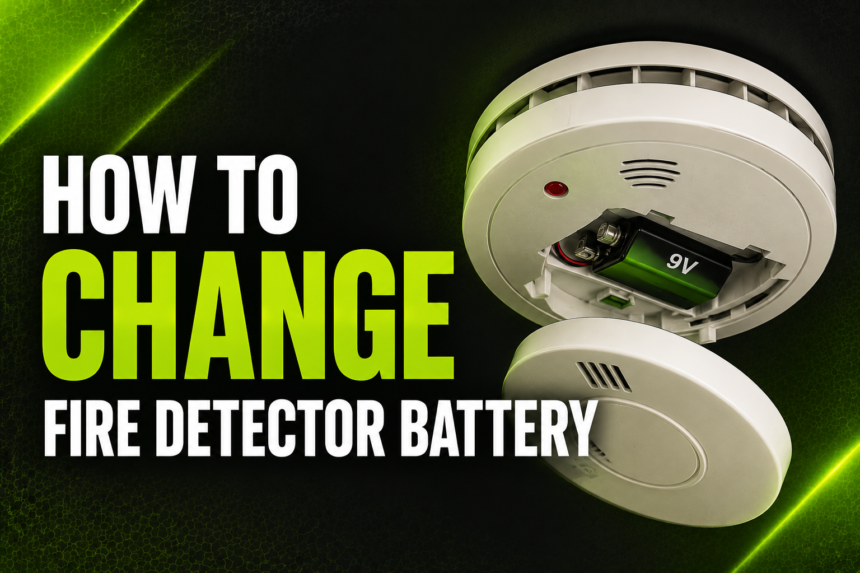
A fire detector, also called a smoke alarm, is one of the most important safety devices in any home. It listens for smoke particles in the air and sounds a loud alarm the moment it senses danger, giving you and your family precious extra seconds to escape. But a fire detector is only as reliable as the battery powering it. A weak or dead battery can turn this life-saving device into a silent, useless box on your ceiling.
- Why Regular Battery Replacement Matters
- Types of Smoke/Fire Detectors
- Battery Types Used in Detectors
- Signs Your Battery Needs Replacing
- Tools You’ll Need
- Step-by-Step Guide to Replacing the Battery
- Turning Off Power (for Hardwired Units)
- Removing the Detector from the Mount
- Opening the Battery Compartment
- Removing the Old Battery Safely
- Inserting the New Battery Correctly
- Reassembling and Remounting the Unit
- Restoring Power (if Applicable)
- Testing the Detector
- How Often Should You Replace the Battery
- Common Mistakes to Avoid
- When to Replace the Entire Detector (Not Just the Battery)
- Safety Tips While Replacing Batteries
- Maintaining Multiple Detectors in a Home
- Frequently Asked Questions (FAQ)
- Conclusion
- Related Articles
Many homeowners avoid dealing with their fire detectors simply because they don’t know how to change fire detector battery correctly, or they assume it’s a complicated task that requires a professional. In reality, it’s a quick and simple job that almost anyone can do in under ten minutes with the right battery and a little guidance.
This article walks you through everything you need to know, from understanding why battery maintenance matters to a full step-by-step replacement process, along with helpful tips to keep your home’s fire safety system working exactly as it should.
Why Regular Battery Replacement Matters
It’s easy to forget about a small device mounted on the ceiling, especially when it seems to be working fine. But fire detectors depend entirely on a functioning power source to do their job. When a battery runs low, the detector’s sensitivity can decrease, or it may stop working altogether without any obvious warning other than a faint chirping sound that many people mistake for background noise.
According to fire safety organizations, a significant number of home fire deaths occur in properties where the smoke alarm was present but not functioning, most often due to a missing, disconnected, or dead battery. Beyond the personal safety risk, many home insurance policies and local fire codes require working smoke detectors in every home. If an inspection reveals a non-functioning detector, it could affect your coverage or lead to fines in some regions. Simply put, replacing the battery on time isn’t just a maintenance chore, it’s a small action that carries real, life-protecting weight.
Types of Smoke/Fire Detectors
Before you can change fire detector battery, it helps to understand what kind of detector you actually have installed, since the process can vary slightly depending on the model.
- Battery-only detectors: These run entirely on a replaceable battery and are not connected to your home’s electrical wiring. They are the simplest to maintain and are commonly found in older homes or added as extra units in specific rooms.
- Hardwired detectors with battery backup: These are wired directly into your home’s electrical system so they never lose power during normal operation, but they include a backup battery that kicks in during a power outage.
- Interconnected systems: Multiple detectors wired or wirelessly linked together so that if one detects smoke, all of them sound simultaneously. These often still contain individual batteries that need periodic replacement.
- Smart detectors: Wi-Fi connected units that send alerts to your phone. These may use standard replaceable batteries or built-in rechargeable batteries, depending on the brand.
Knowing your detector type will help you determine whether you need to cut power at the breaker before starting the replacement process.
Battery Types Used in Detectors
Not all fire detectors use the same battery, and using the wrong type can affect performance or simply not fit the compartment. Here’s a quick breakdown of the most common options.
| Battery Type | Common Use | Typical Lifespan |
|---|---|---|
| 9-volt (9V) | Most traditional battery-powered and backup detectors | 6–12 months |
| AA batteries | Some modern detector models, often two per unit | 6–12 months |
| 10-year lithium (CR123 or sealed lithium) | Long-life, sealed “10-year” detectors | Up to 10 years |
Before purchasing a replacement, check the back of your detector or the printed manual for the exact battery type required. Sealed lithium units are designed so the battery isn’t meant to be swapped out individually; instead, the entire detector is replaced once the battery reaches the end of its life.
Signs Your Battery Needs Replacing
Your fire detector is actually quite good at telling you when it needs attention, as long as you know what to listen and look for. The most common sign is a short, sharp chirping sound that repeats every 30 to 60 seconds. This is different from the loud, continuous alarm sound used to signal actual smoke or fire, and it specifically indicates low battery power.
Many detectors also include a small LED indicator light. A steady green light usually means the unit is powered and functioning normally, while a blinking red or amber light can indicate a low battery or a fault. Additionally, if you press the test button and the detector produces a weak sound, a delayed response, or no sound at all, this is a clear signal that the battery needs to be swapped out immediately.
Tools You’ll Need
One of the best things about this task is how little equipment it requires. Before you begin, gather the following items so you’re not climbing up and down repeatedly.
- A sturdy ladder or step stool, tall enough to comfortably reach the ceiling
- A new battery of the correct type and voltage for your specific detector model
- A small screwdriver, only needed for detectors with a screw-secured battery cover
- Optional work gloves, useful if the detector is older and dusty
Having everything ready beforehand makes the entire process faster and safer, especially since you’ll want a free hand to hold onto the ladder.
Step-by-Step Guide to Replacing the Battery
This is the core part of learning how to change fire detector battery, broken down into simple, manageable steps.
Turning Off Power (for Hardwired Units)
If your detector is hardwired into your home’s electrical system, locate your home’s breaker panel and switch off the circuit connected to the smoke detectors. This prevents any electrical shock risk and stops the alarm from sounding unexpectedly while you’re working on it. Battery-only units can skip this step entirely.
Removing the Detector from the Mount
Most detectors sit on a circular mounting bracket attached to the ceiling or wall. Gently twist the detector counterclockwise, similar to opening a jar, until it releases from the bracket. Some models instead have a small tab that needs to be pushed or slid before the unit detaches.
Opening the Battery Compartment
Once the unit is in your hands, locate the battery compartment. On many models, this is a small drawer or door on the back or side of the detector that pulls or slides open. Some older models require you to remove a few small screws with your screwdriver first.
Removing the Old Battery Safely
Carefully take out the old battery, noting the direction it was inserted, particularly the positive and negative terminals. Set it aside for proper disposal, as batteries should never be thrown in with regular household trash in many areas due to environmental regulations.
Inserting the New Battery Correctly
Take your new battery and insert it in the same orientation as the old one, matching the positive and negative markings exactly. Inserting a battery backwards is a common mistake that prevents the detector from powering on, so double-check the fit before closing the compartment.
Reassembling and Remounting the Unit
Close the battery compartment securely, replacing any screws if applicable. Then align the detector with its mounting bracket and twist it clockwise, or slide it back into place, until it clicks or locks securely into position.
Restoring Power (if Applicable)
If you switched off a breaker earlier for a hardwired unit, return to your panel and turn the circuit back on. Give the detector a few seconds to power up and stabilize.
Testing the Detector
Finally, press and hold the test button on the front of the unit until it emits a loud, clear alarm sound. This confirms the new battery is properly installed and the detector is fully operational. If the sound is weak or absent, recheck the battery orientation and connection.
How Often Should You Replace the Battery
As a general rule, standard 9V and AA batteries in fire detectors should be replaced at least once a year, even if they haven’t started chirping yet, since battery performance can degrade gradually and unpredictably. A helpful and widely recommended trick is to change your batteries whenever the clocks shift for daylight saving time, giving you an easy, memorable schedule to follow twice a year for extra peace of mind.
Sealed 10-year lithium detectors are the exception, as their batteries are designed to last the full lifespan of the unit itself. In these cases, once the battery does eventually run low, it typically means the entire detector should be replaced rather than just the battery.
Common Mistakes to Avoid
Even a simple task like this can go wrong if a few common pitfalls aren’t avoided. Being aware of them ahead of time can save you frustration and, more importantly, keep your home properly protected.
- Using the wrong battery type or a low-quality battery that drains quickly
- Forgetting to press the test button after replacement to confirm it works
- Ignoring persistent chirping, assuming it will simply stop on its own
- Temporarily removing the battery to silence a false alarm and forgetting to put a new one back in
- Mixing old and new batteries in detectors that require more than one
When to Replace the Entire Detector (Not Just the Battery)
Sometimes, a fresh battery isn’t enough to fix the problem, and this usually points to the detector itself reaching the end of its usable life. Most fire detectors have a total lifespan of about 8 to 10 years from the manufacture date, which is often printed on the back of the unit. If your detector is nearing or past this age, is visibly cracked or damaged, or continues to malfunction even after a new battery has been installed and tested, it’s time to replace the whole unit rather than continuing to troubleshoot the battery.
Safety Tips While Replacing Batteries
Since this task involves climbing and working near your home’s electrical system, a few precautions go a long way. Always place your ladder on a flat, stable surface and avoid overreaching to the side, keeping your body centered instead. Never disable or leave a detector without a battery for an extended period, even temporarily, as this leaves that area of your home unprotected. Finally, it’s wise to keep a small stock of spare batteries at home so you’re never caught without one when a detector starts chirping unexpectedly.
Maintaining Multiple Detectors in a Home
Most homes have several fire detectors installed across different rooms and floors, and keeping track of each one individually can quickly become confusing. A simple solution is to replace all batteries on the same day, twice a year, so you’re never guessing which unit was last serviced. Writing the installation or replacement date directly on the detector with a permanent marker, or keeping a simple log on your phone, can also help you stay organized. For interconnected systems, it’s especially important to test all units together after any battery replacement to confirm the entire network is communicating properly.
Frequently Asked Questions (FAQ)
How do I know what battery my fire detector needs? Check the label on the back of the unit or the original product manual, which will specify the exact battery type and voltage required.
Can I use rechargeable batteries in a fire detector? It’s generally not recommended, as rechargeable batteries can lose charge more unpredictably than standard alkaline or lithium batteries, potentially compromising the detector’s reliability.
Why does my detector keep chirping after I changed the battery? This can happen if the battery isn’t seated correctly, if it’s a low-quality or partially used battery, or if there’s residual charge stored in the unit’s circuitry that needs to be reset by removing the battery for a full minute before reinserting it.
Is it normal for a hardwired detector to still need a battery? Yes, hardwired detectors typically include a battery backup specifically for power outages, so the battery still needs regular replacement even though the unit runs primarily on household electricity.
How long does a fire detector itself last, separate from the battery? Most units last around 8 to 10 years before the entire detector should be replaced, regardless of how well-maintained the battery has been.
Conclusion
Understanding how to change fire detector battery is a small task that makes a tremendous difference in the overall safety of your home. From recognizing the early warning signs of a low battery to following a clear, step-by-step replacement process, this simple maintenance habit ensures your detectors are always ready to do their job when it matters most.
Set a recurring reminder, perhaps aligned with daylight saving time changes, and make battery checks a regular part of your household routine. A few minutes of attention twice a year is a small price to pay for the added protection and peace of mind it brings to you and your family.
Related Articles
How Much Does a Hybrid Battery Cost?